Material takeoffs eat hours. Counting fixtures, measuring runs, extracting quantities from schedules—it's tedious but critical work. Get it wrong and you either lose the bid or lose money.
AI won't replace your estimating judgment, but it can dramatically speed up the mechanical parts of takeoff work.
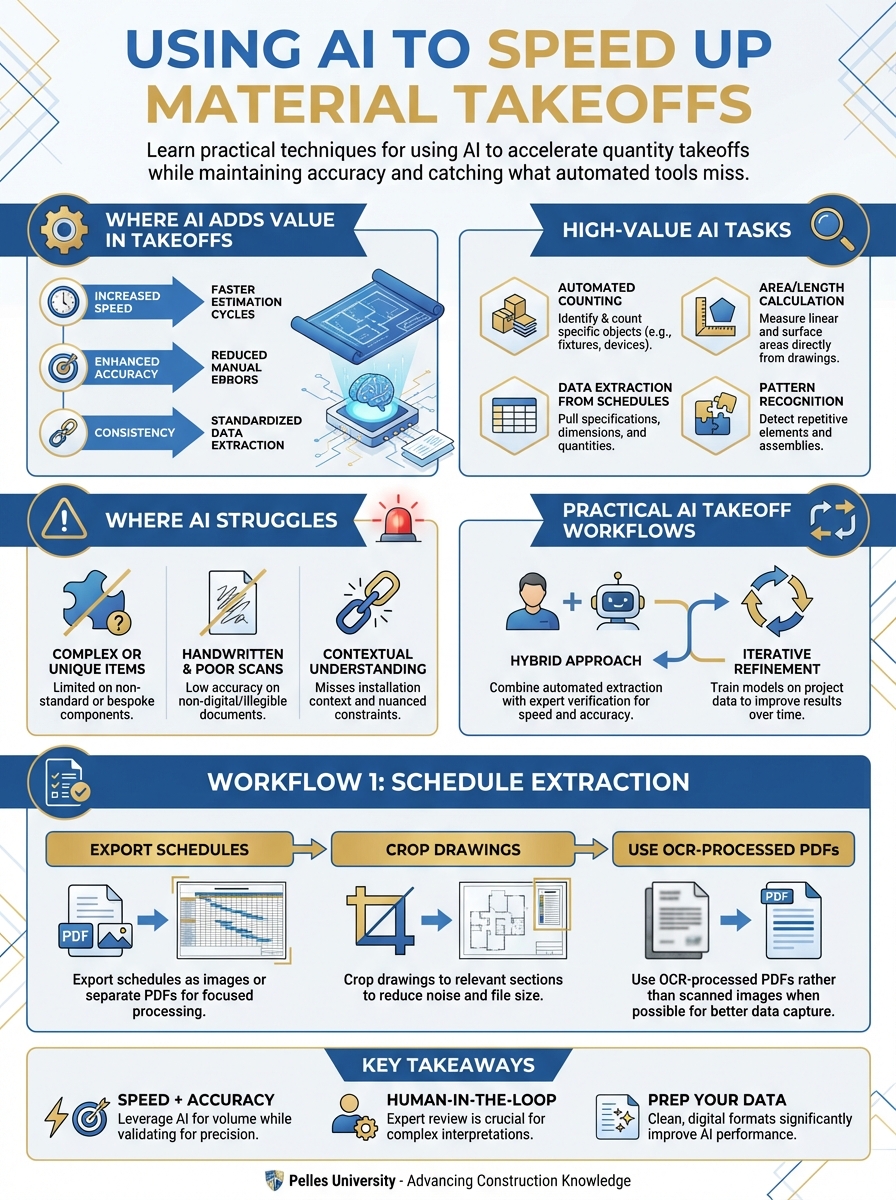
Where AI Adds Value in Takeoffs
High-Value AI Tasks
Schedule extraction: AI excels at pulling quantities from equipment schedules, fixture schedules, and panel schedules. Tables are structured data—AI's strength.
Repetitive counting: Counting devices, outlets, fixtures, heads, and diffusers across drawings. AI can process these faster than manual counting.
Specification parsing: Extracting material requirements, approved manufacturers, and installation requirements from spec sections.
Consistency checking: Comparing schedule quantities against drawing counts to catch discrepancies.
Where AI Struggles
Complex routing: Measuring pipe and conduit runs through congested spaces. AI can't reliably interpret 3D routing from 2D drawings.
Custom fabrication: Ductwork and specialty assemblies where dimensions vary and drawings require interpretation.
Scope judgment: Deciding what's included vs. excluded based on division of work and contract terms.
Drawing interpretation: Unclear details, conflicting dimensions, or ambiguous representations.
Practical AI Takeoff Workflows
Workflow 1: Schedule Extraction
For equipment and fixture schedules:
Extract all items from this equipment schedule.
For each item provide:
- Tag/designation
- Description
- Quantity
- Any specifications (size, capacity, model)

Format as a table I can paste into a spreadsheet.
Feed it photos or exports of schedules. Verify against the original—AI occasionally misreads or combines rows.
Workflow 2: Spec-Based Material Lists
For material requirements from specifications:
Review this specification section and extract:
1. All required materials with specifications
2. Approved manufacturers for each
3. Submittals required
4. Special installation requirements

Organize by CSI section.
This gives you a starting checklist. Cross-reference against what you can actually price.
Workflow 3: Drawing Count Verification
When you've done manual counts:
I counted the following from the electrical floor plans:
- Receptacles: 247
- Switches: 89
- Data outlets: 156

Review this fixture schedule showing all devices.
Do my counts match? Identify any discrepancies.
AI as a second checker catches errors in both directions.
Workflow 4: Scope Comparison
When comparing bid documents:
Compare these two documents:
1. Division 23 spec section (HVAC)
2. Division 26 spec section (Electrical)

What HVAC equipment requires electrical connections?
Create a coordination list showing:
- Equipment item
- Electrical requirements mentioned
- Which spec section references it
This helps ensure you're pricing the right scope.
Setting Up Your AI Takeoff Process
Step 1: Prepare Documents
AI works better with clean inputs:
- Export schedules as images or separate PDFs
- Crop drawings to relevant sections
- Use OCR-processed PDFs rather than scanned images when possible
Step 2: Break Down the Task
Don't ask AI to "do the takeoff." Break it into specific requests:
Bad: "Do a takeoff of this electrical drawing"
Good:
- "Extract all items from the lighting fixture schedule"
- "List all panel boards shown on the one-line diagram"
- "Count receptacle types from this floor plan legend"
Step 3: Verify Everything
Create a verification checklist:
- Schedule totals match specification requirements
- Counts are reasonable for building size
- No obvious categories are missing
- Special items from specs are included
- Quantities align with similar past projects
Step 4: Document AI-Assisted Items
Track which takeoff items came from AI assistance. If errors emerge later, you'll know where to look.
Common AI Takeoff Mistakes to Avoid
Mistake 1: Trusting Complex Drawing Interpretation
AI can miscount overlapping symbols, miss items in crowded areas, or confuse similar symbols. Always spot-check drawing-based counts.
Mistake 2: Missing Specification Requirements
AI might extract schedule quantities but miss spec requirements like:
- Special supports or seismic bracing
- Testing and commissioning scope
- Temporary systems during construction
Mistake 3: Ignoring Context
AI doesn't understand that "provide and install" means something different from "install owner-furnished." Human judgment on scope division is essential.
Mistake 4: Skipping Sanity Checks
Before accepting AI quantities, ask:
- Does this make sense for a building this size?
- How does this compare to similar projects?
- Are there obvious gaps in the list?
AI-Assisted Takeoff Checklist
For each system, verify AI extracted:
Electrical:
- Lighting fixtures by type
- Devices (receptacles, switches, data)
- Panel boards and transformers
- Feeders and branch circuits
- Fire alarm devices
- Low voltage systems
Plumbing:
- Fixtures by type
- Equipment (heaters, pumps)
- Piping systems
- Specialties (floor drains, cleanouts)
HVAC:
- Air handling equipment
- Terminal units
- Diffusers and grilles
- Ductwork (if measurable)
- Piping systems
- Controls and sensors
Fire Protection:
- Sprinkler heads by type
- Standpipes and hose valves
- Fire pump equipment
- Specialty systems
Measuring ROI on AI Takeoffs
Track your time investment:
Before AI:
- Time to extract schedule data: X hours
- Time to verify counts: Y hours
- Total: X + Y hours
With AI:
- Time to run AI extraction: 10-15 minutes
- Time to verify AI output: Y hours (similar or slightly less)
- Total: Y + 0.25 hours
The savings come primarily from the extraction phase. Verification time stays similar, but you're checking rather than creating.
Building Your AI Takeoff Library
Create reusable prompts for:
- Schedule extraction templates by schedule type
- Specification parsing for your common divisions
- Verification checks for quantity reasonableness
- Comparison queries for scope coordination
Save prompts that work. Refine ones that don't.
What's Next
Fast takeoffs only matter if the pricing is right. Next, learn pricing strategies for when to be aggressive versus conservative based on project characteristics and competitive position.
TL;DR
- AI speeds up repetitive takeoff tasks: schedule extraction, counting, spec parsing
- AI struggles with complex routing, custom fabrication, and scope judgment
- Always verify AI quantities—don't trust complex drawing interpretation blindly
- Break takeoff requests into specific, focused tasks
- Track which items came from AI assistance for later error tracing
- The time savings come from extraction; verification time stays similar