Your scope sheet is the backbone of your estimate. Get it wrong, and everything that follows—pricing, exclusions, qualifications—is built on a shaky foundation.
Most estimators spend hours reading through specs and drawings to build a scope list. With the right process, you can cut that to under an hour and catch more than you would manually.
What Makes a Good Scope Sheet
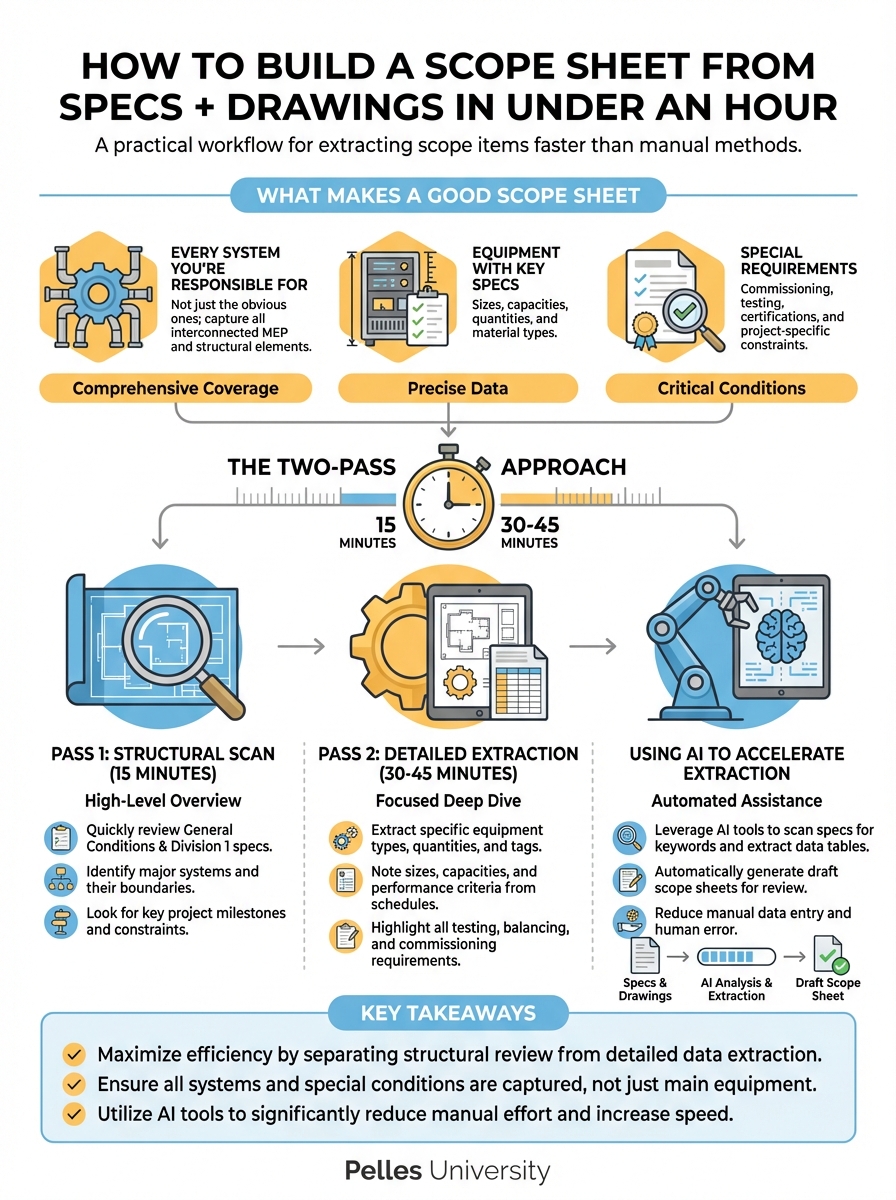
Before we talk process, let's define the output. A solid scope sheet includes:
- Every system you're responsible for (not just the obvious ones)
- Equipment with key specs (sizes, capacities, quantities)
- Special requirements (commissioning, testing, certifications)
- Interfaces with other trades (where does your scope end?)
- Exclusions (what's explicitly not in your scope)
The goal isn't to capture every detail—that's what the estimate is for. The goal is to map the full territory so nothing gets missed.
The Two-Pass Approach
Don't try to build your scope sheet in one read-through. Use two passes with different purposes.
Pass 1: Structural Scan (15 minutes)
Open the spec table of contents and the drawing index. Map out:
From specs:
- Which divisions apply to your trade?
- Are there performance specs or prescriptive specs?
- Any Division 01 requirements that affect your scope?
From drawings:
- How many sheets are in your discipline?
- Are there details on architectural or structural sheets you need?
- Any demo drawings?
Example: An HVAC sub assumed they only needed to review Division 23. But Division 01 included a requirement for temporary heating during construction—a $40,000 scope item they almost missed.
Pass 2: Detailed Extraction (30-45 minutes)
Now you go section by section. For each spec section in your scope:
- Read the "Scope" paragraph at the beginning
- Scan "Products" section for equipment lists
- Check "Execution" section for installation requirements
- Note any testing/commissioning requirements
As you go, add items to your scope sheet in real-time.
Using AI to Accelerate Extraction
Here's where you can compress hours into minutes. Feed spec sections into an AI tool with this prompt:
Review this MEP specification section and extract:
1. All equipment types and quantities mentioned
2. Performance requirements (capacities, ratings, sizes)
3. Special requirements (testing, commissioning, certifications)
4. Scope boundaries (what's included vs. excluded)
5. Any references to other spec sections I should review

Format as a bulleted scope list.
Run this for each relevant spec section. You'll get a structured extraction you can compile into your master scope sheet.
Drawings Extraction
For drawings, the AI approach works differently. Focus on:
- Equipment schedules (these are your quantity source)
- General notes on cover sheets
- Detail callouts that reference specific installation requirements
If you're using AI that can read drawings, ask it to extract equipment from schedules. If not, this part stays manual—but it's faster when you know exactly which schedules to reference.
The Scope Sheet Format
Keep it simple and scannable:
PROJECT: [Name]
TRADE: [Your scope]
DATE: [Date]
ESTIMATOR: [Name]

SYSTEMS INCLUDED:
□ System 1: [Brief description]
  - Equipment: [Key items with sizes]
  - Special requirements: [Testing, commissioning, etc.]

□ System 2: [Brief description]
  - Equipment: [Key items]
  - Special requirements: [If any]

NOTABLE REQUIREMENTS:
- [Requirement 1 with spec reference]
- [Requirement 2 with spec reference]

SCOPE BOUNDARIES:
- Electrical connections by: [Trade]
- Controls by: [Trade]
- Insulation by: [Trade]

EXCLUSIONS:
- [Item 1]
- [Item 2]

CLARIFICATIONS NEEDED:
- [Question 1]
- [Question 2]
Common Scope Sheet Mistakes
Missing Division 01
General requirements often hide scope items: temporary facilities, hoisting, protection, cleanup. Don't skip Division 01.
Ignoring Spec References
When a spec section says "coordinate with Section 23 05 00," go read that section. Scope items hide in cross-references.
Assuming Standard Scope Boundaries
"Electrical by electrical contractor" isn't always true. Check every project—some owners push electrical connections to the mechanical sub.
Skipping Demo Scope
Demo drawings exist. If you're responsible for removing existing equipment, that's scope. And cost.
Not Flagging Unknowns
If something is unclear, don't guess. Add it to your clarifications list. An RFI during bidding is better than a surprise during construction.
Quality Check Your Scope Sheet
Before you move to estimating, verify:
- All spec sections for your trade are accounted for
- Equipment quantities match between specs and schedules
- Testing and commissioning requirements are captured
- Scope boundaries are defined for each interface
- At least 3 clarification questions identified (if you have zero, you didn't look hard enough)
What's Next
A complete scope sheet sets you up for accurate estimating, but it also feeds your inclusions/exclusions list and your qualifications. The next step is building templates for common project types so you're not starting from scratch every time.
TL;DR
- A scope sheet maps the full territory before you estimate—miss something here, and it's missed everywhere
- Use a two-pass approach: structural scan first, detailed extraction second
- AI can extract scope items from specs in minutes—but human review catches what it misses
- Always check Division 01, cross-references, and demo drawings
- Flag unknowns as clarifications—don't guess your way into a scope gap