Every experienced subcontractor has a story: "There was this job where we did all this extra work, but we never got paid for it."
The common thread? No system for tracking changes. Items got lost. Follow-ups didn't happen. By the time anyone noticed, it was too late.
A proper change order log prevents that.
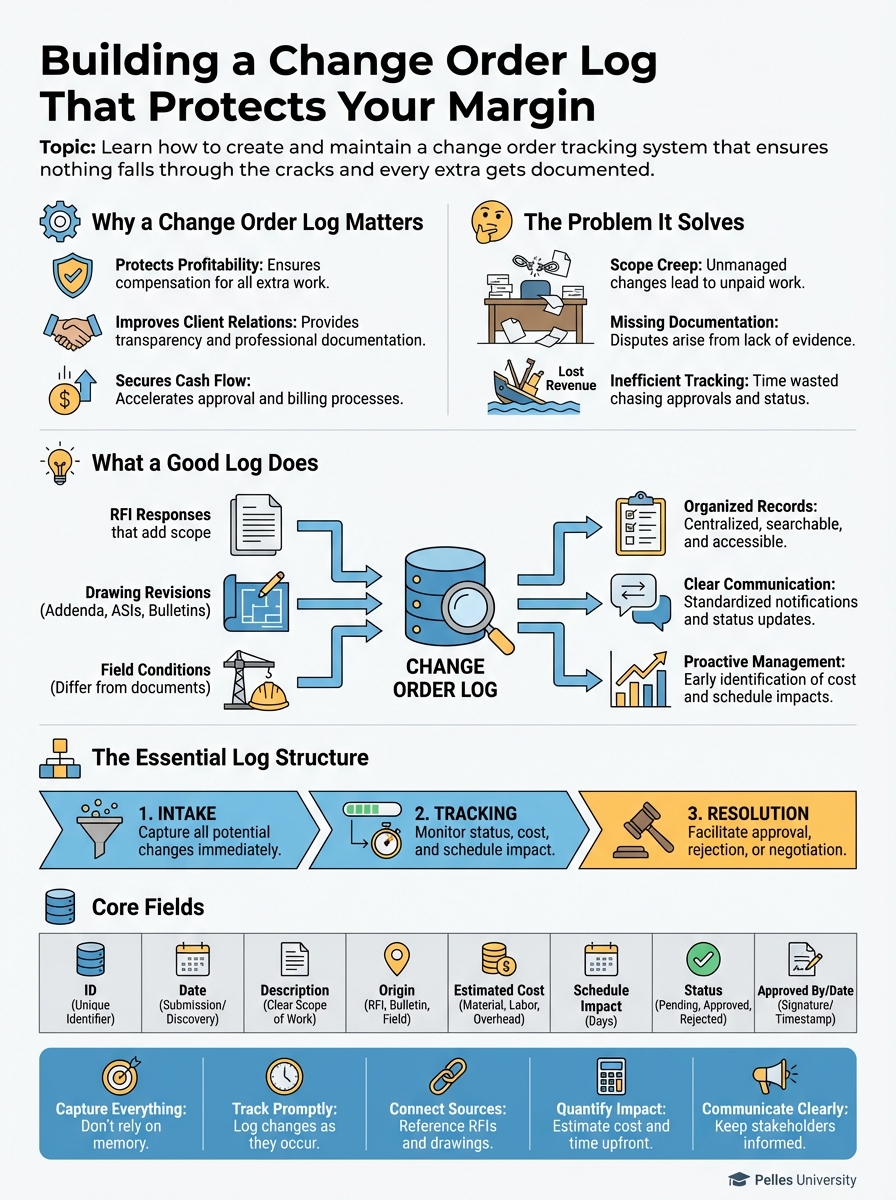
Why a Change Order Log Matters
The Problem It Solves
On any active project, potential changes emerge from:
- RFI responses that add scope
- Drawing revisions (addenda, ASIs, bulletins)
- Field conditions that differ from documents
- Owner directives
- Design clarifications that expand work
- Coordination changes with other trades
Without systematic tracking, some of these slip through. Not because anyone intended to miss them—but because projects are busy and memory is unreliable.
What a Good Log Does
A well-maintained change order log:
- Captures every potential change when identified
- Tracks status through resolution
- Prevents items from falling through cracks
- Provides visibility to management
- Creates project history for disputes
- Feeds closeout and claims processes
The Essential Log Structure
Core Fields
| Field | Purpose |
|---|---|
| CO Number | Unique identifier |
| Date Identified | When you first noticed the change |
| Description | What the potential change involves |
| Source | RFI, ASI, directive, field condition, etc. |
| Contract Basis | Why this is extra (entitlement reference) |
| Status | Current state in the process |
| Estimated Value | Your best estimate of cost |
| Submitted Value | Amount formally requested |
| Approved Value | Amount approved (if different) |
| Date Submitted | When COR was sent to GC |
| Date Resolved | When final resolution occurred |
| Notes | Additional context, follow-up history |
Status Tracking
Use consistent statuses:
| Status | Meaning |
|---|---|
| Potential | Identified, not yet analyzed |
| Pricing | Being estimated |
| Submitted | COR sent to GC |
| Negotiating | In discussion |
| Approved | Agreed, pending paperwork |
| Executed | Formal CO signed |
| Rejected | Denied by GC/Owner |
| Withdrawn | You determined not extra |
| Pending Direction | Waiting for response |
Building the Log
Start Before Day One
Create your log before mobilization. Pre-populate with:
- Known issues from bid phase
- Items you noted in your bid clarifications
- Scope assumptions you're making
Capture Potential Changes Immediately
The moment you see something that might be extra:
- Add it to the log with "Potential" status
- Note the source (what document or situation)
- Don't wait to determine if it's valid—capture first, analyze second
Better to log something that turns out to be base scope than to miss a real change.
Review Triggers
Update the log when:
- RFI responses are received
- ASIs or bulletins are issued
- Drawing revisions arrive
- Field conditions differ from plans
- Verbal directives are given
- Meeting minutes reference changes
- Other trades' changes affect your work
Working the Log
Weekly Review Process
Every week:
- Review new items: What was added this week?
- Update statuses: What moved forward?
- Check stale items: What's been sitting too long?
- Follow up: What needs action?
Monthly Summary
Create a monthly snapshot:
- Total potential changes identified
- Amount submitted
- Amount approved
- Amount pending
- Items requiring attention
Share with project management and leadership.
Escalation Triggers
Set thresholds for escalation:
- Items over $X require PM attention
- Items stale more than 30 days require follow-up
- Rejections require management review
Common Log Management Failures
Failure 1: Only Logging After Submission
Many logs only track formal change order requests. This misses the critical early stage where potential changes should be identified and analyzed.
Fix: Log items at "Potential" stage, before you've decided if they're valid.
Failure 2: No Status Updates
Items get added but statuses don't get updated. You can't tell what's pending vs. resolved.
Fix: Require status updates at least weekly. Stale items should trigger alerts.
Failure 3: Insufficient Description
"Extra work per ASI" tells you nothing months later.
Fix: Write descriptions that a stranger could understand: "Relocated 8 sprinkler heads in corridors 201-204 per ASI #12 dated 3/15 due to revised ceiling plan."
Failure 4: No Owner/Source Reference
Knowing a change happened isn't enough. You need to know why it's extra.
Fix: Always capture what document or event created the entitlement.
Failure 5: Abandoned After Initial Entry
Items get logged and forgotten.
Fix: Regular review process with accountability.
Using Your Log Defensively
During the Project
When GC or owner pushes back on a change:
"Let me reference our log. This item was identified on [date] when ASI #12 was issued. The ASI revised the ceiling plan in areas where we had already installed per the original drawings. I submitted the COR on [date]. What specific questions do you have?"
The log makes your response factual, not emotional.
At Project Closeout
Your log becomes your punchlist for unresolved changes:
- What's still pending?
- What was rejected that you're disputing?
- What supporting documentation do you have?
In Dispute Situations
A complete log with history demonstrates:
- You tracked issues systematically
- You communicated in timely manner
- You followed the contract process
Courts and arbitrators look favorably on parties who documented professionally.
Integrating With AI
AI can help manage and analyze your change order log:
Log Review
Review this change order log and identify:
1. Items that have been "Pending Direction" for more than 14 days
2. Submitted items with no response for more than 30 days
3. Items where estimated value differs significantly from submitted value
4. Patterns in rejection reasons
Summary Generation
Create a monthly change order summary from this log:
- Total potential changes identified: X
- Total value submitted: $Y
- Total value approved: $Z
- Approval rate: A%
- Average days to resolution: B

List items requiring immediate attention.
Closeout Analysis
From this project's change order log, create a closeout summary:
1. Final status of all items
2. Total value approved vs. submitted
3. Items still in dispute
4. Lessons learned for future projects
Change Order Log Template
Here's a starting structure:
| CO# | Date ID'd | Description | Source | Basis | Status | Est. Value | Sub. Value | App. Value | Date Sub. | Date Res. | Notes |
|---|---|---|---|---|---|---|---|---|---|---|---|
| 001 | 3/15 | Relocate sprinkler heads, corridors 201-204 | ASI #12 | Ceiling revision after install | Submitted | $8,500 | $8,200 | - | 3/22 | - | Awaiting response |
| 002 | 3/18 | Add junction boxes at AHU locations | RFI #47 | Not shown on electrical drawings | Pricing | $3,200 | - | - | - | - | Getting quote for boxes |
| 003 | 3/20 | Unforeseen concrete condition at penetrations | Field | Spec says "existing conditions to be verified" | Potential | $5,000 | - | - | - | - | Photos taken 3/20 |
What's Next
A complete change order log helps you track what you've identified. But recognizing extra work in the first place requires knowing what to look for. Next, learn to identify change order situations before you're deep into the work.
TL;DR
- A change order log captures every potential change from identification through resolution
- Log items at "Potential" stage—don't wait until you've decided they're valid
- Include source/basis for entitlement, not just description
- Review weekly, update statuses, follow up on stale items
- Use the log defensively when pushback occurs
- At closeout, the log is your punch list for unresolved changes
- A complete log demonstrates professionalism in disputes