Your foreman spends 30 minutes every day filling out paperwork. Your PM spends an hour after every meeting writing notes. Multiply that across projects and you're looking at full-time positions worth of documentation.
There's a better way.
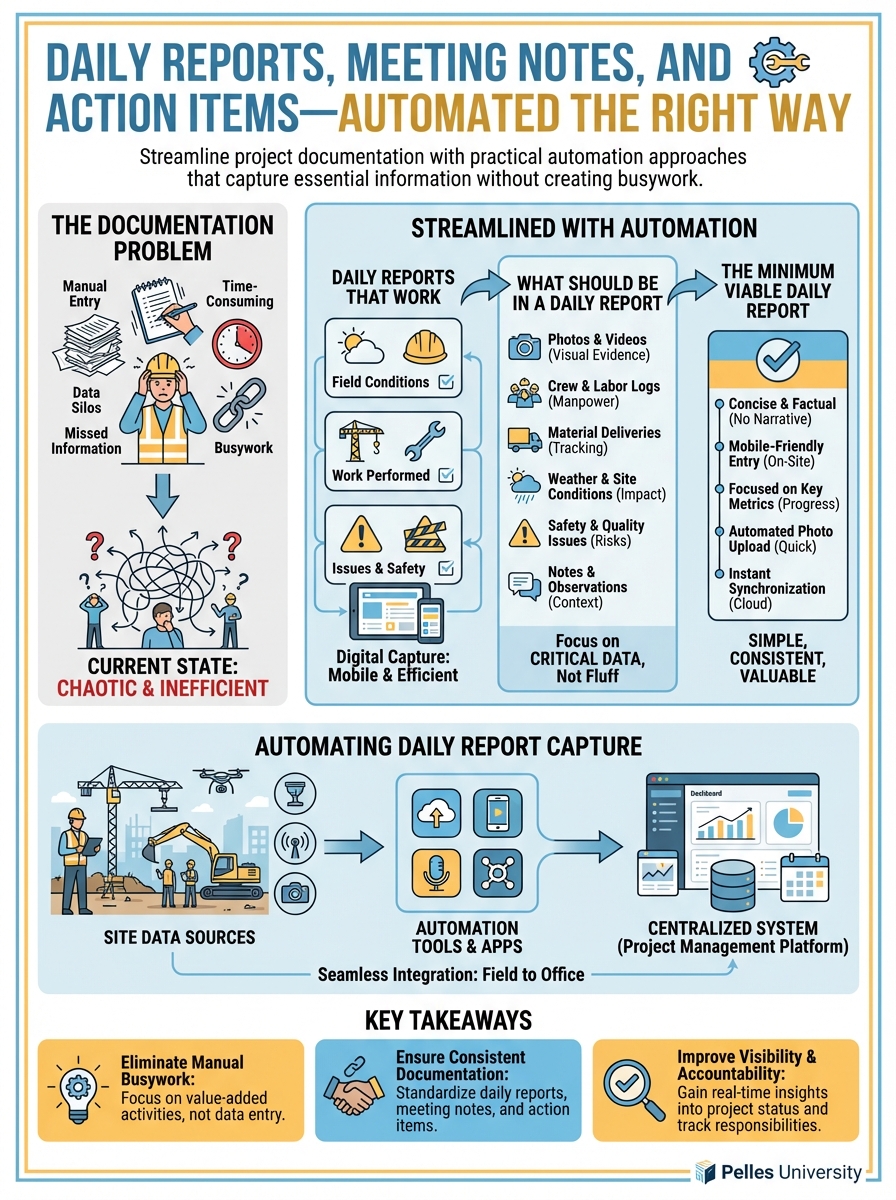
The Documentation Problem
Essential documentation in construction:
- Daily reports (field conditions, work performed, issues)
- Meeting minutes (coordination, OAC, subcontractor meetings)
- Action item tracking
- Progress photos
- Incident reports
The challenge: getting useful information captured without drowning in paperwork.
Daily Reports That Work
What Should Be in a Daily Report
Weather conditions:
- Temperature, precipitation, wind
- Impact on work (if any)
Manpower:
- Crew size by trade
- Equipment on site
Work performed:
- Location and description
- Quantity completed
Delays or issues:
- What happened
- Impact
- Notification provided (to whom)
Deliveries:
- What arrived
- Condition
Visitors:
- Inspections
- Owner/GC site visits
The Minimum Viable Daily Report
Don't capture everything. Capture what matters:
Date: [Date]
Project: [Name]
Weather: [Conditions] / Work Impact: [Yes/No]

Crew: [Number] [Trade] workers

Work Completed:
- [Location]: [Work description] - [Qty if applicable]
- [Location]: [Work description]

Issues/Delays:
- [Issue description] - Notified: [Who] at [Time]

Deliveries: [List or "None"]

Notes: [Anything unusual]

Foreman: [Name]
This takes 5-10 minutes, not 30.
Automating Daily Report Capture
Voice-to-text option: Foreman records a 2-minute voice note. AI transcribes and formats into report template.
Transcribe this daily report audio and format into:
- Weather and impact
- Manpower count
- Work completed (with locations)
- Issues encountered
- Deliveries received

[Audio transcription]
Photo-based option: Foreman takes photos of work completed. Photos are tagged with location and description. AI generates daily summary from photo metadata and tags.
Form-based option: Mobile form with dropdowns and minimal typing. Most fields are selections, not text entry.
Meeting Notes Without the Pain
The Meeting Notes Problem
Most meeting notes fail because:
- Nobody wants to take them
- They're written after the meeting (forgotten details)
- They don't capture action items clearly
- They never get distributed
The 3-Part Meeting Note
1. Decisions Made What was decided? By whom?
2. Action Items Who is doing what by when?
3. Open Issues What wasn't resolved? Who owns follow-up?
Skip the narrative. Capture what matters.
During-Meeting Capture
Use this template in the meeting:
Meeting: [Type] - [Date]
Attendees: [List]

DECISIONS:
- [Decision 1]
- [Decision 2]

ACTION ITEMS:

| Item | Owner | Due |
|------|-------|-----|
| [Task] | [Name] | [Date] |
| [Task] | [Name] | [Date] |

OPEN ISSUES:
- [Issue]: Owner - [Name]

Next Meeting: [Date/Time]
The PM fills this in during the meeting—not after.
AI-Assisted Meeting Notes
Record the meeting (with consent). Use AI to extract:
Extract meeting notes from this transcript:

[Meeting transcript]

Provide:
1. Key decisions made
2. Action items with owner and due date
3. Unresolved issues with assigned owner
4. Any schedule or cost impacts discussed

Format as a structured meeting summary.
The AI draft becomes your starting point. Edit for accuracy.
Action Item Tracking That Sticks
The Action Item Trap
Action items from meetings go into notes. Notes go into folders. Items never get done.
The Persistent Action List
Maintain one action list per project. Update it every meeting.
| # | Item | Owner | Created | Due | Status | Notes |
|---|---|---|---|---|---|---|
| 1 | Submit chiller O&M | PM | 1/15 | 1/30 | Open | |
| 2 | Resolve AHU-3 conflict | Engineer | 1/10 | 1/17 | Closed | RFI-025 |
| 3 | Provide T&M backup | Foreman | 1/18 | 1/25 | Open | CO-003 |
Review at every coordination meeting. New items added. Completed items closed.
Automated Action Tracking
Connect action items to email/calendar:
- Action assigned → email notification to owner
- Due date → calendar reminder
- Overdue → escalation to PM
Most project management tools can automate this. Use them.
Photo Documentation
What to Photo Document
- Concealed conditions before cover-up
- Existing conditions before work
- Work progress at milestones
- Issues and defects
- Deliveries and material storage
- Any unusual conditions
Photo Discipline
Consistent naming:
[Date]_[Location]_[Description].jpg
Immediate upload: Don't let photos sit on phones. Upload daily.
Tagging: Add metadata: location, system, issue type
AI-Assisted Photo Processing
Review these project photos and:
1. Identify what's shown in each image
2. Categorize by type (progress, issue, delivery, etc.)
3. Flag any visible issues or concerns
4. Generate suggested file names

[Upload photos]
This accelerates organization without manual tagging.
Building Documentation Habits
The 5-Minute Rule
Any documentation task that takes more than 5 minutes is too complex. Simplify the form or process.
The End-of-Day Checkpoint
Before leaving site:
- Daily report completed
- Photos uploaded
- Issues logged
Before leaving office:
- Meeting notes distributed
- Action items updated
- Tomorrow's priorities set
The Weekly Review
Every week, verify:
- All daily reports filed
- All meeting notes distributed
- Action items current
- Photo log up to date
What's Next
Good documentation is evidence. The next step is building searchable archives—so when you need to find the photo from April or the meeting note from the kickoff, you can find it in seconds.
TL;DR
- Daily reports should take 5-10 minutes, not 30—capture what matters, skip the rest
- Meeting notes need three things: decisions, action items, open issues—skip the narrative
- Maintain one persistent action list per project—review it every meeting
- Photo documentation needs discipline: consistent naming, immediate upload, tagging
- Use AI to transcribe, extract, and organize—but humans review for accuracy