Addendum 4 drops 48 hours before bid. Your estimate is 80% complete. Now what?
Addenda are a fact of life in construction bidding. The question isn't whether they'll arrive—it's whether you have a system to process them without missing critical changes or burning hours you don't have.
Here's how to handle addenda efficiently.
The Addendum Problem
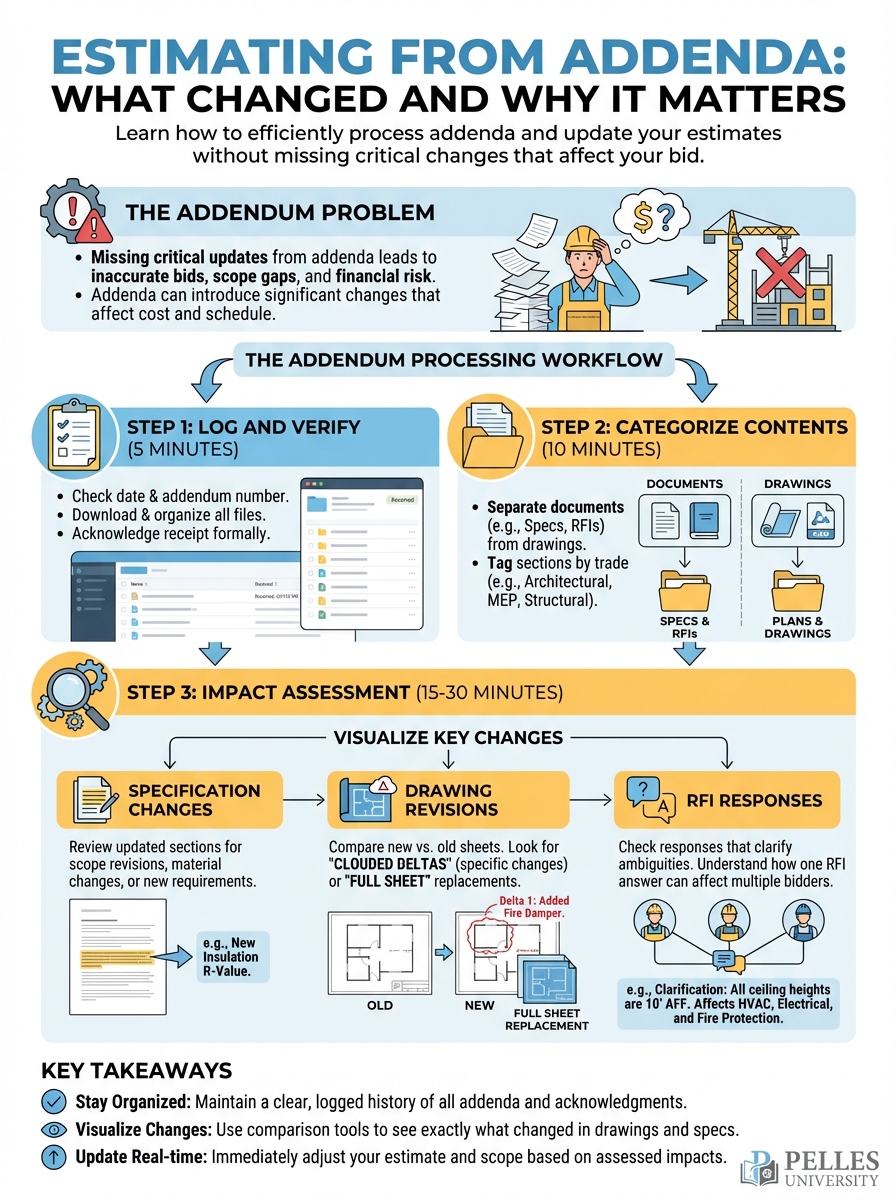
Addenda typically include:
- Specification changes
- Drawing revisions (sometimes full sheets, sometimes clouded deltas)
- RFI responses that affect multiple bidders
- Bid date extensions (the good news)
- Scope clarifications (the "gotcha" potential)
The challenge: addenda don't tell you what changed—they tell you that something changed. You still have to find it.
Example: An addendum issued revised mechanical drawings M-201 through M-210. The transmittal didn't say what changed. The estimator assumed minor revisions. The change? Two additional air handlers worth $85,000 added to the penthouse. They didn't catch it until after award.
The Addendum Processing Workflow
Step 1: Log and Verify (5 minutes)
When an addendum arrives:
- Log it immediately – Date received, addendum number, page count
- Check for predecessors – Is this Addendum 3 but you never got 2?
- Verify against plan room – Sometimes addenda go to plan rooms but not your inbox
Step 2: Categorize Contents (10 minutes)
Scan the addendum and sort into categories:
Drawing changes:
- Which sheets?
- Full reissue or delta (clouded changes)?
Spec changes:
- Which sections?
- Complete replacement or insertions?
RFI responses:
- Which RFIs?
- Do any affect your scope?
Commercial/procedural:
- Bid date changes?
- Submission requirement changes?
- Form modifications?
Step 3: Impact Assessment (15-30 minutes)
For each item in your scope:
| Item | Change Type | Impact Level | Action |
|---|---|---|---|
| M-201 | Full reissue | High | Re-review sheet |
| Spec 23 21 13 | New para 2.3.1 | Medium | Check equipment requirements |
| RFI-023 | Clarification | Low | Note in file |
Focus your time on high-impact items. Don't spend an hour on RFI responses that don't affect your trade.
Step 4: Update Your Estimate
For each high-impact change:
- Identify what was in your original takeoff
- Compare to revised documents
- Adjust quantities, equipment, or scope
- Document the change – You may need this for clarifications
Step 5: Update Your Bid Form
Most addenda require acknowledgment on your bid form. Make sure:
- All addenda are acknowledged
- Addendum numbers match what was issued
- You have the latest bid form (sometimes addenda revise the form itself)
Using AI to Speed Up Addendum Review
The highest-value use of AI in addenda processing is finding what changed.
For Spec Changes:
Compare these two versions of Specification Section 23 21 13.

Identify:
1. New requirements added
2. Requirements removed
3. Requirements modified
4. New product specifications
5. Changes to testing or commissioning requirements

For each change, explain the potential cost or scope impact.
For Drawing Changes:
If you have OCR-capable AI:
Compare these two versions of mechanical drawing M-201.

Identify:
1. Equipment added or removed
2. Quantity changes
3. Routing changes
4. New details or notes
5. Schedule changes
Without AI drawing comparison, focus on:
- Equipment schedules (easy to extract and compare)
- General notes (often change without clouds)
- Detail callouts (new details added?)
The Addendum Checklist
Before submitting your bid, verify:
Receipt:
- All addenda received (check plan room for any you might have missed)
- All addenda logged with date received
- Electronic copies saved to project folder
Review:
- Each addendum categorized (drawings, specs, RFIs, commercial)
- High-impact items identified
- Estimate updated for scope changes
- New gotchas flagged
Documentation:
- All addenda acknowledged on bid form
- Addendum numbers listed correctly
- Clarifications updated if addendum affects your qualifications
Common Addendum Mistakes
Mistake 1: Assuming Clouds Catch Everything
Drafters don't always cloud every change. Critical modifications can appear without visual markup, especially in:
- Equipment schedules
- General notes
- Specification text
Don't rely on clouds alone.
Mistake 2: Skipping "Clarification Only" Addenda
Some addenda are labeled as "clarification only, no price impact." Review anyway. Clarifications can affect your exclusions or assumptions.
Mistake 3: Not Updating Your Qualification Letter
If an addendum changes something you qualified in your bid, update the qualification. Otherwise you've got a conflict.
Mistake 4: Missing the Bid Form Change
Addenda sometimes include revised bid forms. If you submit on the old form, you may be non-responsive.
When Addenda Keep Coming
If addenda are still arriving close to bid day, consider:
- Request an extension – If the addendum is substantial, ask the GC
- Qualify your bid – "Bid based on addenda through #4 received [date]. Review of subsequent addenda in progress."
- Prioritize scope changes over cosmetic changes – Equipment matters more than room name changes
What's Next
Processing addenda is reactive. The proactive version is building a comparison workflow you can run automatically when new documents arrive. That's where document comparison tools and AI start to pay dividends at scale.
TL;DR
- Addenda don't tell you what changed—you have to find it, which is where time gets lost
- Categorize addendum contents first: drawings, specs, RFIs, commercial
- Focus your time on high-impact changes that affect quantities or scope
- Use AI to compare spec versions and identify changes you might miss manually
- Always verify all addenda are acknowledged on your bid form before submission