"The GC says this is in our spec. Where?"
You've got the full spec book—400+ pages across dozens of sections. The answer is in there somewhere. But the foreman needs it now, not in twenty minutes.
Here's how to find things fast.
How Specs Are Organized
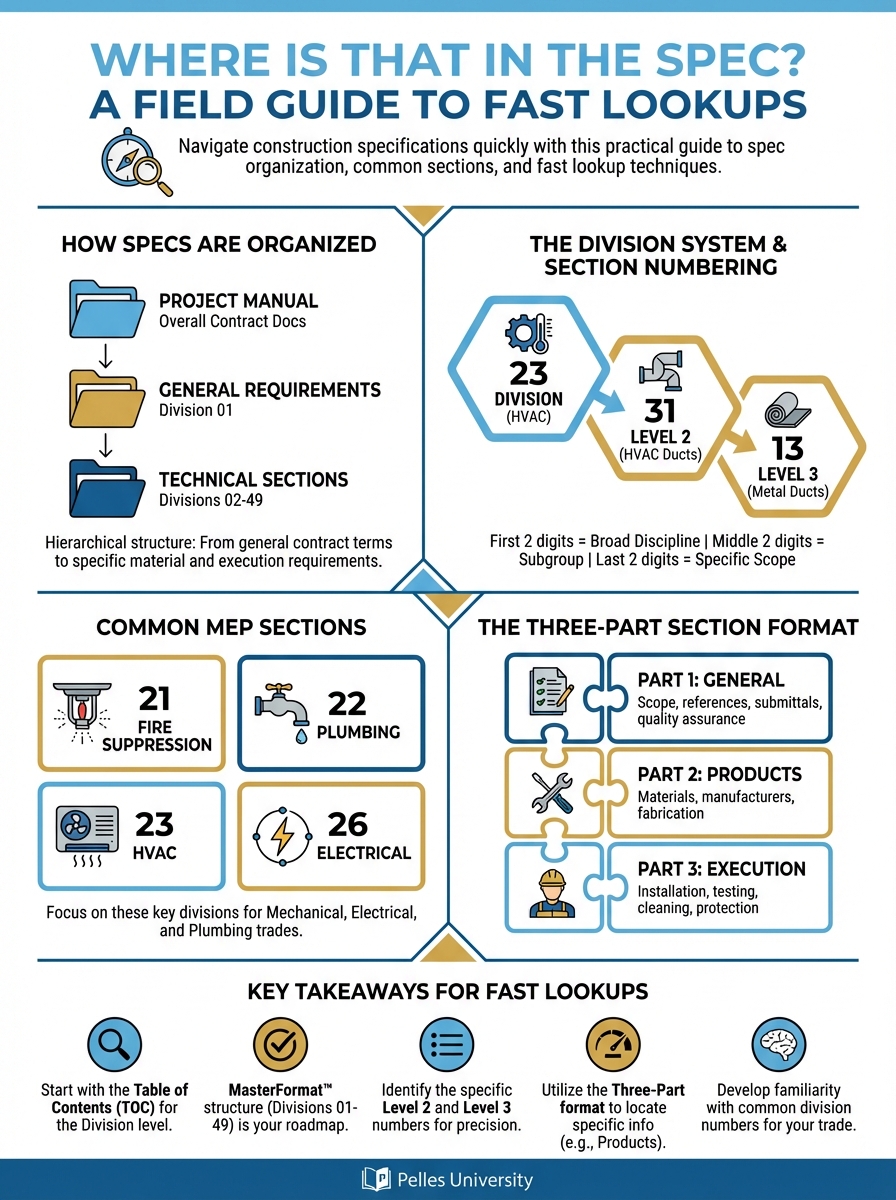
Construction specifications follow a standard organization called MasterFormat. Understanding this structure is your map.
The Division System
MasterFormat organizes specs into divisions:
| Division | Content |
|---|---|
| 01 | General Requirements |
| 02-14 | Site & Structural |
| 21 | Fire Suppression |
| 22 | Plumbing |
| 23 | HVAC |
| 25 | Integrated Automation |
| 26 | Electrical |
| 27 | Communications |
| 28 | Electronic Safety |
For MEP subs, Divisions 22, 23, and 26 are your primary focus—but Division 01 affects everything.
Section Numbering
Each section has a six-digit number:
23 31 13 - Metal Ducts
- 23 = Division (HVAC)
- 31 = Level 2 (HVAC Ducts)
- 13 = Level 3 (Metal Ducts)
Once you understand the pattern, you can predict where things are.
Common MEP Sections
Plumbing (Division 22):
- 22 05 00 - Common Work Results
- 22 11 00 - Facility Water Distribution
- 22 13 00 - Facility Sanitary Sewerage
- 22 14 00 - Facility Storm Drainage
- 22 40 00 - Plumbing Fixtures
HVAC (Division 23):
- 23 05 00 - Common Work Results
- 23 07 00 - HVAC Insulation
- 23 21 00 - Hydronic Piping
- 23 31 00 - HVAC Ducts
- 23 34 00 - HVAC Fans
- 23 73 00 - Air Handling Units
- 23 81 00 - Decentralized HVAC
Electrical (Division 26):
- 26 05 00 - Common Work Results
- 26 24 00 - Switchboards and Panelboards
- 26 27 00 - Low-Voltage Distribution
- 26 28 00 - Low-Voltage Circuit Protective Devices
- 26 50 00 - Lighting
The Three-Part Section Format
Every spec section follows the same structure:
Part 1: General
What the section covers and administrative requirements:
- Related documents
- Submittals required
- Quality assurance
- Delivery and storage
- Warranty requirements
When to look here: Submittal requirements, warranty terms, qualifications
Part 2: Products
Materials and equipment specifications:
- Manufacturers
- Materials
- Equipment schedules
- Fabrication requirements
- Source quality control
When to look here: Acceptable manufacturers, product specifications, material requirements
Part 3: Execution
How to install:
- Preparation
- Installation methods
- Field quality control
- Testing
- Closeout requirements
When to look here: Installation requirements, testing procedures, workmanship standards
Fast Lookup Techniques
Know Your Division 01
Division 01 applies to everyone. Key sections:
01 33 00 - Submittal Procedures
- How to format submittals
- Response times
- Resubmittal requirements
01 45 00 - Quality Control
- Testing requirements
- Inspection procedures
- Documentation
01 73 00 - Execution
- Cutting and patching
- Progress cleaning
- Starting and adjusting
01 77 00 - Closeout Procedures
- Final cleaning
- O&M manuals
- Training
- Warranties
Always check Division 01 for overriding requirements.
Use the Table of Contents
Every spec book has a table of contents. Before searching, scan it:
- Find your division
- Identify likely section
- Go directly there
Don't scroll through pages—use the roadmap.
Section Keyword Shortcuts
Looking for specific topics? Check these sections first:
For hanger requirements:
- 23 05 29 - Hangers and Supports for HVAC
- 22 05 29 - Hangers and Supports for Plumbing
- 26 05 29 - Hangers and Supports for Electrical
For insulation:
- 23 07 13 - Duct Insulation
- 23 07 19 - HVAC Piping Insulation
- 22 07 19 - Plumbing Piping Insulation
For testing:
- Part 3 of equipment sections (23 73 00, etc.)
- 23 05 93 - Testing, Adjusting, Balancing
- 22 08 00 - Commissioning of Plumbing
For warranties:
- Part 1 of equipment sections
- 01 78 36 - Warranties
- 01 78 00 - Closeout Submittals
The "Common Work Results" Shortcut
Every MEP division has a "Common Work Results" section (XX 05 00):
- 22 05 00 - Plumbing Common Work
- 23 05 00 - HVAC Common Work
- 26 05 00 - Electrical Common Work
These sections contain requirements that apply across the entire division. Check them first for general questions.
Common Field Questions and Where to Find Answers
"What's the approved manufacturer?"
Look in: Part 2 of the specific equipment section
Example: For AHU manufacturers, check 23 73 00, Part 2, under "Manufacturers" or "Acceptable Products"
"How do I install this?"
Look in: Part 3 of the specific equipment section
Example: For VAV installation, check 23 36 13, Part 3, under "Installation"
"What testing is required?"
Look in: Part 3 of equipment section, plus 23 05 93 (TAB section)
Example: For chilled water testing, check 23 21 13, Part 3 under "Field Quality Control"
"What paperwork do I need to submit?"
Look in: Part 1, "Submittals" paragraph, plus 01 33 00
"What's the warranty period?"
Look in: Part 1 of equipment section, "Warranty" paragraph, plus 01 78 36
"Can I use a substitution?"
Look in: 01 25 00 or 01 60 00 (Substitution Procedures)
"What are the clearance requirements?"
Look in: Part 3 of equipment section, "Installation" paragraph
Also check referenced codes (NEC, IMC) for code-required clearances.
Building a Quick Reference Card
Create a project-specific reference card:
PROJECT: [Name]
SPEC DATE: [Issue Date]

QUICK LOOKUPS:
- Submittals: 01 33 00
- Testing: 01 45 00, 23 05 93
- Warranties: 01 78 36
- Substitutions: 01 25 00

MEP SECTIONS:
- AHUs: 23 73 00
- VAVs: 23 36 13
- Ductwork: 23 31 13
- CHW Piping: 23 21 13
- Plumbing Fixtures: 22 40 00
- Panels: 26 24 00

KEY REQUIREMENTS:
- Insulation: See 23 07 xx
- Hangers: See 23 05 29
- Firestopping: 07 84 00
Print this and keep it accessible.
Using Search Effectively
When using PDF search:
Search Exact Terms
Less effective: "insulation" More effective: "duct insulation thickness"
Specific searches find specific answers.
Search Spec Language
Specs use specific terminology:
| Instead of | Search for |
|---|---|
| "hook up" | "connection" |
| "bolt down" | "anchor" |
| "test" | "field quality control" |
| "paperwork" | "submittals" |
| "warranty" | "warranty period" |
Matching spec language gets better results.
Search Section Numbers
If you know the likely section:
- Search "23 31" to find duct sections
- Search "26 24" to find panel sections
Section number searches are precise.
AI-Assisted Spec Lookups
Using AI tools for spec searches:
In the project specifications, find the insulation requirements
for supply air ductwork.

Include:
- Insulation type
- Thickness/R-value
- Specific section reference
The AI will search across sections and compile the answer.
When to Use AI vs. Manual
Use AI for:
- Questions that might span multiple sections
- Complex requirements with cross-references
- General "where is" questions
Use manual for:
- Verification of AI answers
- When you know exactly which section to check
- Quick confirmations during inspections
Training Field Teams
Basic Training Checklist
- Understand MasterFormat division structure
- Know how to use table of contents
- Understand three-part section format
- Know where to find common requirements
- Practice using PDF search effectively
Create Quick Guides
For each project, create trade-specific quick guides:
HVAC Quick Guide:
- Ductwork: 23 31 13
- Insulation: 23 07 13
- Testing: 23 05 93
- Equipment: 23 73 00, 23 81 26
Plumbing Quick Guide:
- Piping: 22 11 16
- Fixtures: 22 40 00
- Testing: 22 05 00
- Insulation: 22 07 19
Build Lookup Skills
Practice exercises:
- Find the submittal requirements for VAV boxes (answer: 23 36 13, Part 1)
- Find the testing pressure for chilled water (answer: 23 21 13, Part 3)
- Find the warranty period for packaged units (answer: 23 81 26, Part 1)
Regular practice builds speed.
What's Next
Fast spec lookups answer immediate questions. The next step is building checklists that proactively extract requirements—so you're not looking things up during installation, but before it.
TL;DR
- Specs follow MasterFormat: Division + Section Number (e.g., 23 31 13 = Metal Ducts)
- Every section has three parts: General (admin), Products (materials), Execution (installation)
- Division 01 applies to everyone—check it for overriding requirements
- Common Work Results sections (XX 05 00) contain division-wide requirements
- Build a project-specific quick reference card for fast lookups