The most expensive change orders are the ones you never recognize.
Work gets done. Costs get incurred. And it's only months later—or never—that someone realizes it wasn't in the original scope. By then, documentation is incomplete, memories have faded, and your leverage is gone.
Recognizing extra work early isn't just about documentation. It's about training yourself and your team to see change order opportunities hiding in everyday project activities.
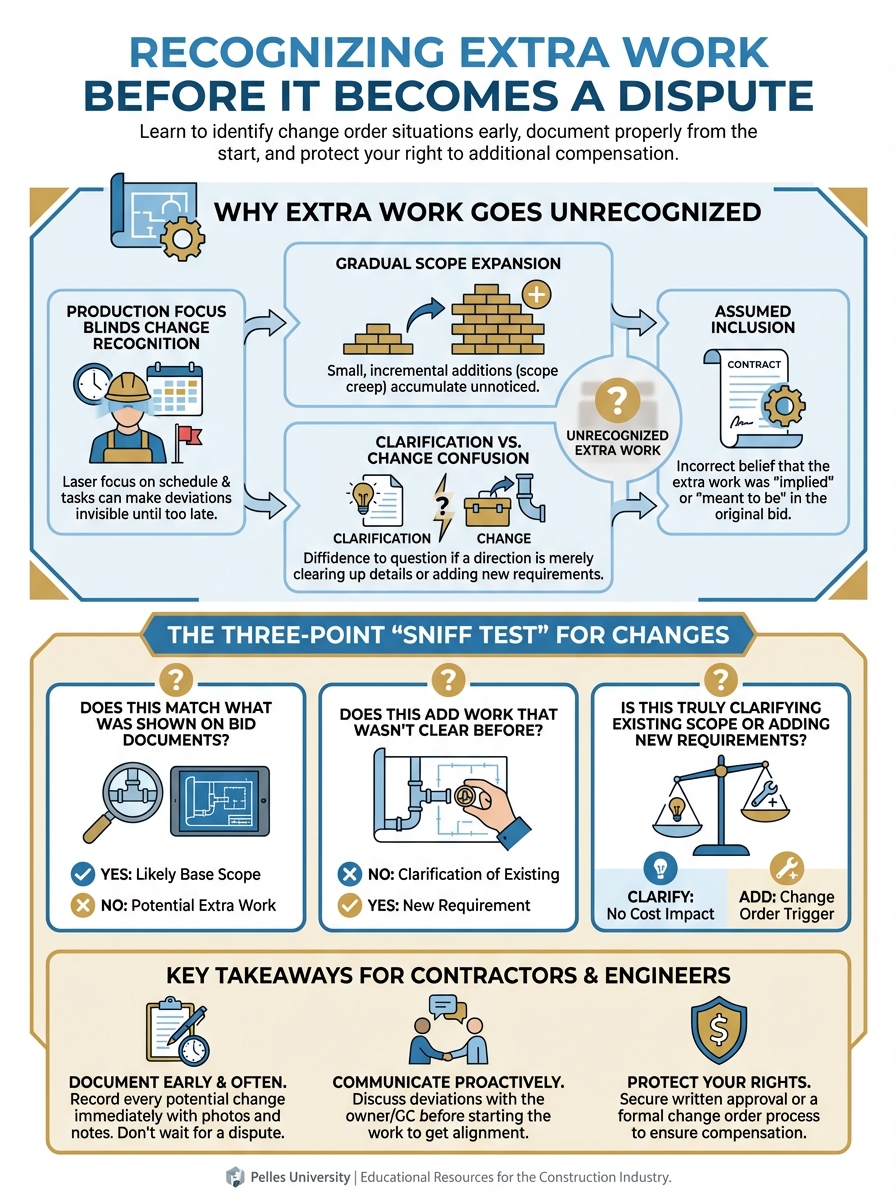
Why Extra Work Goes Unrecognized
Production Focus Blinds Change Recognition
Your foreman's job is to install the work. When an RFI response says "install per attached sketch," they install per the sketch. They're not comparing it to the original drawings to see if the scope changed.
Gradual Scope Expansion
"While you're there, can you also..." requests accumulate. Each one seems small. None triggers formal change recognition. Together, they're significant.
Clarification vs. Change Confusion
RFI responses labeled "clarification" may actually add scope. The word "clarification" doesn't mean it isn't extra—it means that's what someone called it.
Assumed Inclusion
"That must have been in our scope" is a dangerous assumption. If you didn't price it, you didn't include it.
Common Sources of Hidden Extra Work
RFI Responses
The architect responds to your RFI with a sketch or direction. Questions to ask:
- Does this match what was shown on bid documents?
- Does this add work that wasn't clear before?
- Is this truly clarifying existing scope or adding new requirements?
Many RFI responses contain scope expansion disguised as clarification.
Design "Clarifications"
Supplemental instructions, architect's site instructions, and bulletins often add scope:
- Additional requirements not in original specs
- Higher standards than originally specified
- New coordination requirements
"Per industry standard" or "as required by code" additions may not have been in your bid.
Meeting Minutes Commitments
Meeting discussions get captured in minutes as commitments:
- "Electrical to provide additional junction boxes for AHU access"
- "Fire protection to add heads in new storage area"
Review minutes carefully. Commitments documented there may be treated as agreed even if you didn't realize you agreed.
Other Trades' Changes
When other trades have changes, the ripple effects may affect you:
- Relocated equipment requires rerouting your systems
- Revised ceiling plans affect your device locations
- Structural changes impact your penetration locations
Other trades' changes are often your extra work.
Owner Decisions
Owner selections and decisions mid-project:
- Equipment selections that differ from bid documents
- Finish selections that affect your work
- Occupancy changes that require system modifications
These may create changes even without formal ASIs.
Field Conditions
What you find doesn't match what was shown:
- Existing conditions differ from drawings
- Concealed obstructions require rerouting
- Structural conditions require different approaches
If the documents said one thing and reality is another, that's potentially extra.
The Recognition Framework
When you encounter any of these, ask:
Question 1: Was This Clearly Required?
Look at the contract documents at bid time:
- Is this work shown on the drawings?
- Is this work specified in the specifications?
- Is this work included in the scope definition?
If the answer is "no" or "unclear," you have a potential change.
Question 2: Was This Priced?
Review your estimate:
- Did you carry quantities for this work?
- Did you carry labor for this condition?
- Did you include this in your bid?
If you didn't price it, you didn't include it.
Question 3: What Changed?
Identify the trigger:
- RFI response expanded the requirement
- ASI revised the design
- Field condition differed from documents
- Owner directed something different
Document the source of the change.
Training Your Team
Field Personnel Education
Your foremen and superintendents need to recognize changes:
Train them to ask:
- "This isn't what I saw in the bid drawings. Is this extra?"
- "The RFI response is different from what was originally shown. Should I flag this?"
- "This field condition doesn't match the documents. Who should know?"
Give them a simple process:
- When in doubt, flag it to the office
- Take photos of conditions
- Note dates and who directed the work
- Don't assume things are included
Regular Document Review
Assign someone to review incoming documents:
- Every RFI response checked against original scope
- Every ASI analyzed for impact
- Every bulletin evaluated for extra work
Don't let documents pile up unreviewed.
Weekly Change Review Meetings
Dedicate time specifically to change recognition:
- What happened this week that might be extra?
- What documents came in that need analysis?
- What field conditions were encountered?
Make change recognition a recurring agenda item.
Documentation When You Recognize a Change
Immediate Actions
When you identify potential extra work:
- Document the trigger: What document or event created this?
- Photograph conditions: Before, during, if relevant
- Note the date: When you encountered it
- Identify the source: Who directed the work or what document requires it
- Add to change log: Don't let it fall through cracks
Notice Requirements
Many contracts require timely notice of changes. Check your contract for:
- Notice deadlines (often 7-14 days from discovery)
- Required format (written, to whom)
- What constitutes valid notice
Failure to provide timely notice may waive your rights. When in doubt, send written notice.
Reservation of Rights
If you must proceed without agreement:
"We are proceeding with [work description] as directed. This work was not included in our original scope per [contract reference]. We reserve the right to request additional compensation. Formal change order request to follow."
This protects your position while keeping work moving.
Using AI for Change Recognition
AI can help analyze documents for potential changes:
RFI Response Analysis
Compare this RFI response to the original drawing detail.

Original drawing section: [reference]
RFI response sketch: [attached]

Identify any differences that represent added scope or changed requirements.
ASI Impact Analysis
Review this ASI against our scope of work.
ASI content: [attached]
Our scope: Division 23 HVAC installation

What changes in this ASI affect our work?
Is any of this work additional to what would have been required before?
Meeting Minutes Review
Review these meeting minutes for commitments that may affect our scope.
Our trade: Electrical
Our original scope: [summary]

Flag any items assigned to us or affecting our work that may not be in our original scope.
Prevention Through Proactive Management
Bid Phase Protection
At bid time:
- Document assumptions clearly
- Note scope limitations in your bid
- Exclude ambiguous items specifically
- List documents your bid is based on
Contract Kickoff
At project start:
- Review contract documents carefully
- Note potential problem areas
- Establish change recognition processes
- Train your team
Ongoing Vigilance
Throughout the project:
- Review every incoming document for change potential
- Question requests that seem beyond scope
- Document everything that might be extra
- Follow up on pending change items
What's Next
Recognizing extra work is the first step. Getting paid requires proper documentation and negotiation. Next, learn effective strategies for change order negotiation.
TL;DR
- Extra work often goes unrecognized because field teams focus on production, not entitlement
- Common hidden sources: RFI responses, meeting minutes, other trades' changes, field conditions
- Ask: Was this clearly required? Was this priced? What changed?
- Train field personnel to flag potential changes immediately
- Assign someone to review all incoming documents for change impact
- Document immediately: trigger, photos, dates, sources
- Send notice per contract requirements—failure may waive rights
- When in doubt, reserve rights and document